|
The DAM Way
A Simple Technique To Make Money Online on YOUR Time
courtesy of: PotPieGirl.com
...for those with a strong will and an unbreakable spirit...
Being an affiliate marketer is a beautiful thing. No inventory, no customer service, no shipping.....none of those issues. You are simply using a specially-coded link to send people to the person or company that DOES have to deal with those things. If you make a sale, you make a commission.
For the most part, that is all there is to it.
So let's figure out what YOU are going to promote online.
Before we get started, I want to say this very clearly:
There is no such thing as the "perfect product" to promote.
The DAM Way is not about WHAT you promote, it's about HOW you promote it.
You can choose to promote a product from Amazon.com or anything you want - you just have to sign up to be an affiliate for whichever company you chose and get your affiliate link (it's usually free to be an affiliate for most companies).

For example, if you're totally into a certain kitchen gadget you have, or repairing model trains fascinates you, or you enjoy hunting, or you've always wanted to learn more about scrapbooking, or you're really good with PhotoShop....
Anything you want.
If there is a product that goes with it, and there is an affiliate program you can join so you can get paid to promote it, you can use it with The DAM Way.
However, for most of you, I recommend starting by promoting products from ClickBank.com
ClickBank is the largest provider of digital products in the world. People like me list our eBooks on Clickbank to sell them and then people like you choose to promote them by being an affiliate.
Once you sign up for a free affiliate account with Clickbank (easy to do), you are qualified to promote any, or ALL, of their thousands and thousands of products.
Clickbank is reliable with their payments (in over 3 years, I've never ever had an issue with payment. They pay like clockwork). They have a huge variety of digital products on every topic imaginable....and, the best part -
The commissions are HUGE. We're talking, 50%... 60% ... even 75% commission for a sale.
For example, one of my products on Clickbank is One Week Marketing. I have two price points for my product (different package options). One package sells for $47 - the other for $77 (all normal digital product price-points).
I offer a 75% commission to my affiliates - we're talking over $50 per sale for the $77 package to my affiliates.
That's good money!
Just 2 sales a day and you are already making $100 a day online =)
So, I bet you're wondering..... why in the world would a vendor offer such high commissions?
Simple - we have very low over-head to sell our products. Since it is in a digital/download format, there is no inventory, there is no shipping - there's virtually no cost once the work of creating the product, the product website, and all that is completed.
Due to this low-overhead situation, vendors like me are more than happy to pay big commissions to those that bring traffic to our sales pages and try to make sales. Heck, after my work is done, the affiliates are the ones that work harder than I do!
This is why I recommend Clickbank products and why I will be using them in The DAM Way.
However, what YOU choose to promote is totally up to you.
If you'd like to go ahead and sign up for a free Clickbank account now so you can work along with me, you can do that by clicking here- choose the "affiliates" option. (that will open in a new window so you don't lose your place.... I'll wait).
Got your account? Good! Let's Find You a Clickbank Product To Promote
You can use the "marketplace" search feature within the Clickbank site if you'd like. While it's gotten a bit better over time, it's still not the easiest to navigate.
I like to use a site called cb-analytics.com
Go ahead and click that and take a look at the site - it will open in a new window so we don't lose each other.
As you can see, there's lots of stuff going on there. At the top are 3 lists of product that are grouped by different metrics of something Clickbank calls "gravity".
Now, we're not gonna get all wrapped up in stats and stuff, but I'll tell you what "gravity" is because it is something to keep an eye on. (I said "keep an eye on" - I did NOT say, "OBSESS over"....lol!)
Gravity is Clickbanks way of representing the popularity of a product.
In short, and without getting too complicated...
If one unique affiliate sells ONE copy of that product in the last 8 weeks, that product is awarded ONE gravity point.
If one unique affiliate sells ONE HUNDRED copies of that product in the last 8 weeks, that product is still only awarded ONE gravity point.
So, for example, if a product has a gravity of 241, that simply means that 241 unique affiliates have made at least ONE sale of that product in the last 8 weeks.
That's all it is. It's a math formula so sometimes you will see odd numbers like 241.5 for a gravity score. This does not mean there is HALF an affiliate walking around....it's just the result of their math formula....lol.
Again, we're not obsessing over this here, ok?
Gravity can tell you two important things about a product:
1. How well other affiliates can convert that product into a sale, and
2. How many other affiliates YOU are going to be in competition with.
There is no "perfect" gravity score for the "perfect" product to promote - so please don't ask me that.
Gravity is simply an indicator.
Ok, back to picking a product.
You can play around on the site.... use the search bar and type in things you are interested in (gardening, relationships, child care, pregnancy, whatever.....there's a product (or 10) for just about anything you can think of in there), then take a look at the things that are returned for your search.
Here is an example seach I did when I searched for cooking:
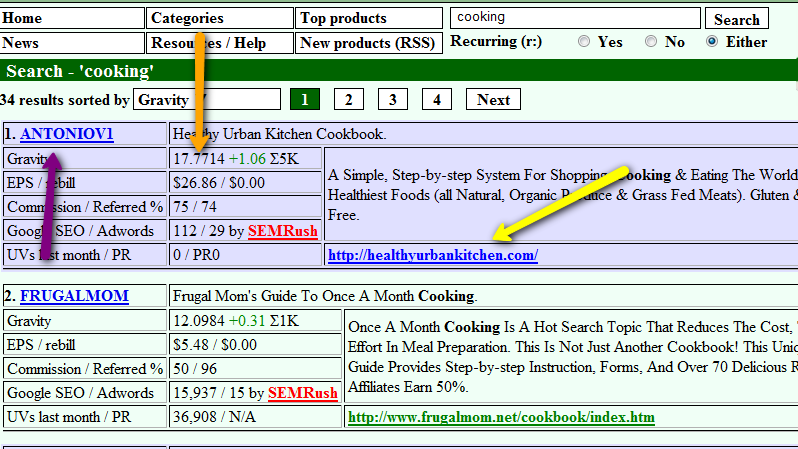
The purple arrow I added points to the vendor code which is also a link to a page on the cb-analytics site that has more info about that product.
The orange arrow points to the gravity of that product. Underneath that is the "EPS" which stands for Earned Per Sale. This amount represents the average commission affiliates are receiving per sale of this product (takes into account refunds,etc). Underneath that are two numbers - Commission/Referred%
Commission is the % commission the vendor is offering to affiliates
Referred % is the ratio of affiliate sales vs sales made directly by the vendor (ie, non affiliate sales of that product).
In this image we see 75/74
This means that the vendor is offering 75% commission and 74% of the product sales are affiliate sales.
The rest of those numbers are not overly important to us now but if you'd like to read all about them in-depth, you can do that here.
The yellow arrow shows the link directly to the product sales page (that link is not YOUR affiliate link so please don't use that to promote!). Above that link is a short description of that product.
Out of all the mumbo-jumbo on that page, that is all you need to worry about now.
Once you find a product that interests you (remember, there is no "perfect product" so pick something that interests you - it will be much easier to write that way) click the link of the vendor code (the purple arrow) and let's go to the product page.
For this example, I will click the product I just had in the image above.
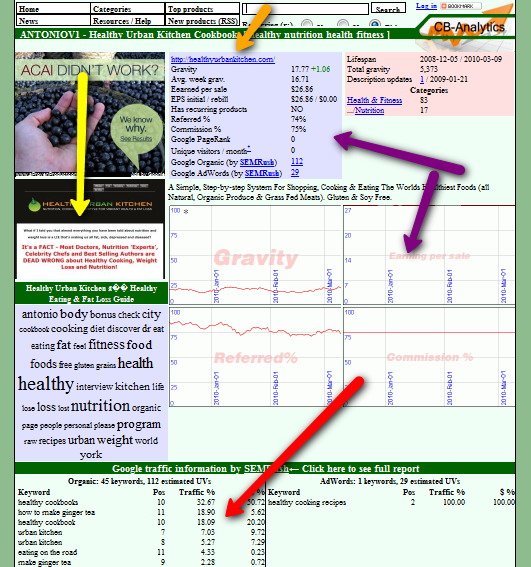
Now we have a page that tells us more about this product.
The purple arrows show the stats you saw on the search page and also depict those same stats into graph charts.
The yellow arrow is a snapshot of the sales page (which you can click to go to the sales page and check it out - again, that is not your affiliate link).
The red arrow at the bottom is some helpful info.
These words are words and phrases that the product sales page ranks for in Google. In other words, this is a hint about topics you should be writing your articles about to send traffic to that sales page. Not all products have words here so don't freak if your chosen product doesn't.
Up at the top, the little orange arrow is a link to the sales page, too. However, when you hold your mouse over it, a little window will appear that shows you how you affiliate link should look.
So go ahead, poke around the site and see if you can find something that interests you to get started.
Once you find a product you'd like to promote, get out some paper or open a blank notepad .txt file on your computer because you're going to take some notes that you'll need later.
Remember, we are NOT stressin' and obsessin' over this process!
Right now, we want to get you through the process. I promise that once you have done all this ONCE it will be super easy to do after that (and you'll probably do it from memory next time - BUT, I will give you a short checklist at the end of The DAM Way).
So, pick a product and go to it's product page on cb-analytics.
Now we'll make YOUR unique affiliate link!
CLICK HERE TO GO TO THE NEXT PAGE (page 6)
| 