|
The DAM Way
A Simple Technique To Make Money Online on YOUR Time
courtesy of: PotPieGirl.com
...for those with a strong will and an unbreakable spirit...
Ok! Let's Make YOUR Affiliate Link!
Now, I want you to hold your mouse over that link to the sales page I pointed to with the orange link (at the top) - let that little box open up, put your mouse in it, then click together your Ctrl button and your "c" button on your keyboard. This is a shortcut to copy something.
Now, put your mouse in your blank .txt notepad file and hold Ctrl and "v" together. This will "paste" what you just copied into your new notes file.
 (for those that like the right mouse click/copy option... you can try it, but sometimes the box goes away on me when I am doing it to get my link on this site) (for those that like the right mouse click/copy option... you can try it, but sometimes the box goes away on me when I am doing it to get my link on this site)
Got it?
Easy, right?
If you want to write it down, that's fine, too.
Now, we want to turn that link into YOUR affiliate link.
For my product that I am using in this example, the affiliate link format they gave me looks like this:
http://xxx.antoniov1.hop.clickbank.net/
"antoniov1" is the vendor ID (same as what is in the green bar all that at the top left of the product info page)
the "xxx" is what we need to change to be YOUR affiliate ID with Clickbank.
(I added the colors... yours won't have that)
When I signed up for Clickbank, I made my user name "PotPieGirl" (I know, surprise, surprise) - so if I wanted to promote this product and make my own unique affiliate link for it so *I* got credited for sales, my link would now look like this:
http://potpiegirl.antoniov1.hop.clickbank.net/
Easy, right?
Now, do that for YOUR chosen product with YOUR unique Clickbank id (remember, your link will have both a different affiliate name and a different vendor name since it is a different product AND a different affiliate. However, the hop.clickbank.net part will always be the same).
Now, keep that affiliate link you made in your note file.
note: Clickbank refers to their affiliate links as "hop links". So, if you see the term "hop link", just know that is the same thing as an affiliate link.
Ready to try out your affiliate link and see if it works?
Good! Let's do it!
You should ALWAYS check your links online to be SURE they work. There is no worse feeling than realizing your weren't making sales because you had a broken or incorrect link online! Yikes!
Now, take that unique link you just made and copy/paste it into your browser window (the address bar at the top)
Click go and let the page load.
You should now see two things -
1. The sales page for that product, and
2. YOUR unique affiliate id at the end of the new web address in your browser window.
This is how mine looks now:

See how it has my Clickbank id at the end? That shows me that not only is the affiliate link working BUT it is also crediting ME for the click (and any sales).
note: Every now and then there is a vendor that has his site coded a special way so that the affiliate part does not show in the browser window. If you do NOT see your Clickbank ID, try this - look on the sales page for the "buy now" or "add to cart" button and click it - don't worry, you aren't buying anything - now, scroll to the bottom of the Clickbank invoice page. You shoulds see [affiliate=______]. That area should have YOUR id in the blank. For me, it would say [affiliate=potpiegirl]. If you see your Clickbank code there, you're good to go.
It would look like this if I checked my link:
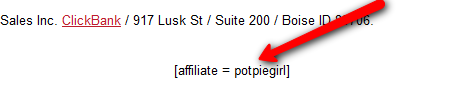
If yours is working, make sure you have it in your notes and let's get the last little piece of info we need from cb-analytics.
Remember the red arrow that pointed down to those words the sales page ranks in Google for?
If they are relevant to the topic of your product, write (or type) then down in your notes. We'll use these later.
Ok, that's it! You now have your product, your affiliate link, and some notes to move on.
So, let's move on!
CLICK HERE TO GO TO THE NEXT PAGE (page 7)
| 