A Simple Technique To Make Money Online on YOUR Time
courtesy of: PotPieGirl.com
...for those with a strong will and an unbreakable spirit...
Alrighty! Now let's set up your website "call forwarding"!
Using GoDaddy's domain forwarding option is very simple. I imagine other companies that sell domain names offer this, too, but I have only used GoDaddy so that is what I will teach.
You only need two things to forward a GoDaddy domain name:
1. Your GoDaddy account log-in info (check your email - GoDaddy emailed it to you)
2. Your affiliate link that we made earlier that you put in your notes file
Yup, that's it!
So, lets do it!
First thing you need to do is log in to your GoDaddy account.... once you are logged in, you will see "Domains" up at the top left under the "Home" tab. If it looks a little different when you read this, you want to get to "My Domains" or "Domain Manager" or "Manage My Domains". Right now, when I hold my mouse over the "Domains" tab at the top, a drop-down menu appears and I can see my domain manager option over on the right. Click that and a list of your domain names will appear.
Now, watch this video and I will walk you through the rest.
Just a note: GoDaddy and other sites tend to change around the way things look fairly often so if your screen looks different than mine, don't sweat it. Just look for the things I tell you to - the process is the same even if the pictures or layout are different.
Your domain forwarding won't instantly happen. It could take an hour...it could take 24 hours...but it will all resolve and work properly.
Once it is working, you will be able to type your new domain name into your address bar and then see YOU affiliate id at the end of the url.
DON'T FORGET TO CHECK IT!
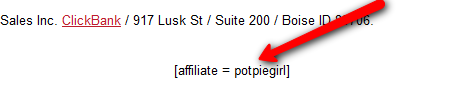
As a double check (or if your Clickbank id isn't showing in the browser window), click the "buy now" or "add to cart" button on the sales page as if you were going to buy it. When the Clickbank payment screen appears, scroll to the bottom and look for:
[affiliate= xxxxxxx]
the xxxxxxxx part should say YOUR Clickbank id. Like this for mine:
If it DOES, you're good to go. If it does NOT, repeat thruough your steps and see if you didn't miss something.
BONUS FOR THIS DOMAIN NAME FORWARDING OPTION:
Let's say that you try one product on the cooking topic and it doesn't seem to be working for you or the vendor takes the product off the market.
That sounds like a real problem, doesn't it?
It's not! All you have to do is find another similar product, get your affiliate link, and then change the domain forwarding option in GoDaddy to the new product. That's it! All your links everywhere on the web are now pointing to your new product.
Now, THAT is easy AND a nice bonus, isn't it??
Alrighty then.... look how much you have learned and gotten DONE already!
You learned about beavers....
You learned about The DAM Way....
You learned about Clickbank....
You learned how to find a product....
You learned how to make your affiliate link....
You bought a domain name..... AND
You set the domain name up to forward thru your affiliate link to the sales page!
NICE!!!! Well Done!
Now, let's learn from our friend the beaver and get to work The DAM Way!